FAQs
How do I know if it’s actually doing anything?
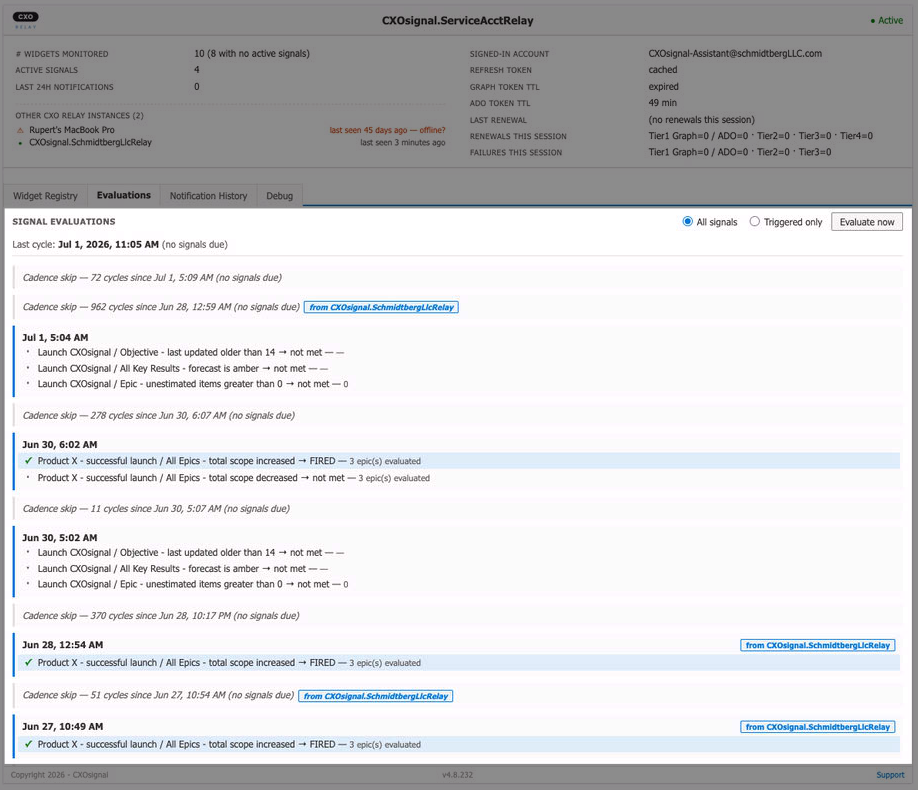
Click the Evaluations tab. It shows the relay’s history of evaluation cycles — one entry per 5-minute cycle, with which Signals fired (if any). If the list is populating with timestamps from the last few minutes, the relay is working as expected.
Can I run CXOrelay under my personal Microsoft account?
Yes. The install steps are identical — just use your own credentials in Operator Step 4 instead of the service account’s. You’ll lose the four benefits listed in the Recommended deployment pattern page (continuity, branded sender, separation of duties, dedicated machine), but the relay itself will function correctly. People do this for proof-of-concept setups all the time. For anything you intend to run for more than a few weeks, switch to the service-account pattern.
Does the service account need a paid Microsoft 365 license?
Yes — it needs at minimum an Exchange Online mailbox license. Business Basic is the cheapest option that includes Exchange. Without a mailbox, the relay’s sign-in succeeds, but the email-delivery step fails with “the user has no Exchange mailbox.” Total cost: typically $6–$12 USD/user/month depending on your region and plan.
What if the dedicated project already has other widgets / other purposes?
It still works — you can host the relay in any ADO project where the service account has Project Admin. The only reason we recommend a brand-new dedicated project is access control: a project specifically for “the CXOrelay infrastructure” is easier to lock down to the small group of people who maintain it. If you’d rather host the relay in an existing project, that’s fine; just grant the service account Project Admin on that project instead.
What if the person who set up CXOrelay leaves the company?
With the service-account pattern: nothing changes. The relay keeps running under the service account, completely independent of any individual. The departing person doesn’t need to hand anything off — just remove their personal access to the dedicated project as part of offboarding. Whoever inherits responsibility for the relay just needs Project Admin on the same project.
Can multiple people share the service account credentials?
Yes, but you don’t usually need to. Day-to-day operation requires no human intervention — the relay runs autonomously once signed in. The only times someone needs the service account password are: (a) re-signing in after a long Microsoft session expiry (every 60–90 days), (b) modifying relay configuration (rare). For (a) and (b), a password vault accessible to your ops team is the typical pattern. Do not share the password informally over chat or email.
Can I use one service account for both OKRsignal widgets AND CXOrelay?
Yes, but we strongly discourage that. OKRsignal widgets are usually created and configured by the OKR owner (a real human with a stake in the OKR’s outcome). CXOrelay is a monitoring daemon. Using one service account for both means a single shared identity owns all the OKR data and sends all the notification emails — which obscures the actual ownership of each OKR. The recommended pattern: humans configure OKRsignal widgets under their own accounts; the dedicated service account exists solely to run CXOrelay.