Common gotchas
The Sign-in popup is blocked
Safari blocks popups by default. The first time you click Sign in, look for a notification at the top of the browser asking if you want to allow the popup. Click Allow and click Sign in again. (Chrome and Edge typically don't block the first popup.)
Sign-in fails with "AADSTS50011: The redirect URI specified in the request does not match"
You'll need help with this from your IT Admin. The Entra app registration's redirect URI doesn't exactly match what CXOrelay sends. Go back to the Entra admin center → your app → Authentication, and confirm the redirect URI is exactly https://www.cxosignal.com/msal-redirect.html (no trailing slash, no typos) AND that it's registered as Single-page application (SPA), not "Web". The most common cause is picking "Web" by mistake in Admin Task 4.3.
Sign-in fails with "Need admin approval"
Your tenant requires admin consent for the requested permissions, and your account isn't an admin. Go back to Admin Task 4.5 and ask your IT admin to click the "Grant admin consent for [tenant]" button on the API permissions page. Then try signing in again.
Sign-in popup loads forever / never returns
Usually a network issue or a corporate firewall blocking login.microsoftonline.com or www.cxosignal.com. Check the same browser can reach cxosignal.com as a normal page; if not, ask IT to allow it through the firewall.
Widget shows ● Active but Widget Registry tab is empty
Your sign-in is fine; the relay just hasn't discovered any OKRsignal widgets yet. Three possible causes, in order of likelihood:
- No OKRsignals defined yet. CXOrelay only sees widgets that have at least one Signal configured. Check that at least one of your OKRsignal widgets has a Signal defined under its Signals tab. Wait 5 minutes (the next discovery cycle) and refresh.
- You signed in as a guest account, not a member account. See the warning callout in the Recommended deployment pattern section: Microsoft Entra silently isolates the EDS namespace for guest users, so a guest-signed-in relay sees an empty registry even when the tenant has dozens of widgets. Verify the account you signed in as is a member of your tenant (created inside it, licensed by it), not a guest invited from another tenant. If you accidentally signed in as a guest, sign out via the config panel and sign back in as the correct member account.
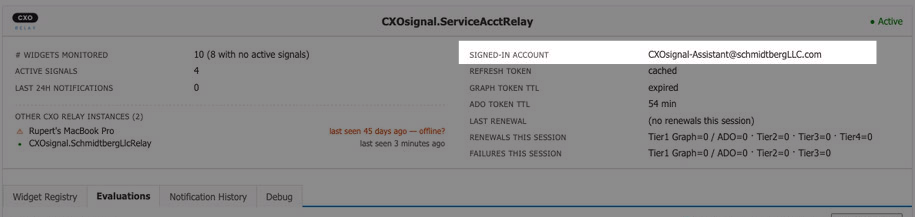
- You signed in as the wrong account. The signed-in account shown in the right-column of the relay header should be the service account (or your operator account if you're going personal-account). If it's some other Microsoft account that happens to have been cached in your browser, sign out and sign back in with the correct account.
Widget shows ⚠ Not signed in after some time
Typically happens when your machine goes into sleep mode or the browser tab showing CXOrelay was closed or hidden. Your Microsoft session expired — usually after 24 hours of inactivity or up to 90 days depending on your tenant. Open the config panel, go to Sign in to Microsoft, and click Sign in again. Quick fix.