Epic completion forecasts
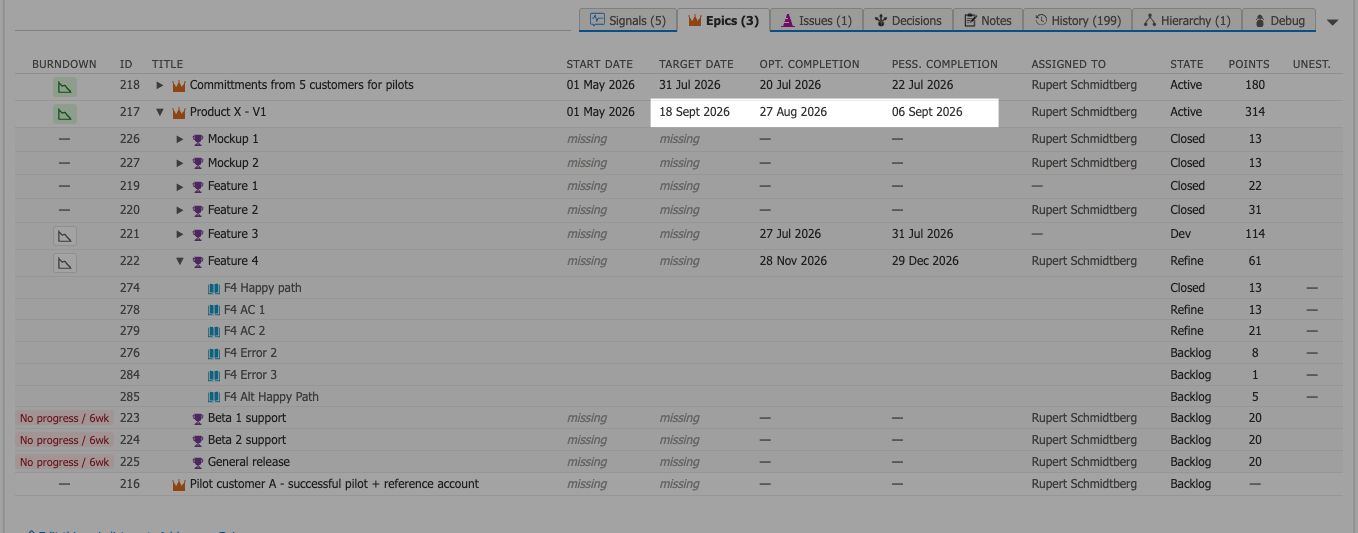
When you set the Target Date field on an Epic in Azure DevOps, OKRsignal displays this date in the Epics row and uses it to show whether the forecast completion date falls before or after the Target Date. Without a target date, OKRsignal cannot show whether the Epic is on track.
For each connected Epic, OKRsignal generates a completion forecast based on the remaining story points in the Epic and your team's recent delivery velocity. The forecast gives you a date range — not a single date — that represents when the Epic is likely to complete given current progress.
How the forecast is calculated
OKRsignal calculates the forecast using three inputs:
- Remaining story points — the total story points on Features and Stories under the Epic that are not yet in a completed state
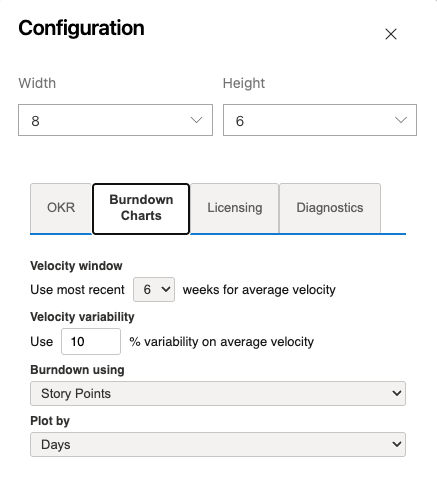
- Team velocity — the average story points completed per week over a configurable velocity window
- Velocity variability — a percent variability for your team's average velocity
The Velocity window and Velocity Variability are set on the OKRsignal configuration screen.
The forecast shows the optimistic (high-velocity) and pessimistic (low-velocity) completion estimates. If the Epic's target date is earlier than the pessimistic completion date, OKRsignal flags the Epic as at risk by highlighting these dates in amber.